
Cloud AI vs On-device: Choosing the Right Architecture for Your Mobile App
 By Kok Weng•Published at 29 Jul, 2025•Updated 22 Oct, 2025
Key Takeaways
- Cloud AI provides scalable, powerful computing ideal for complex tasks, while On-Device AI ensures privacy, low latency, and offline functionality.
- Cloud AI offers advanced features, cost-effective initial investment, and real-time scalability—best suited for apps like chatbots, recommendation engines, and fraud detection.
- On-Device AI enables instant processing, stronger data privacy, and offline operation—ideal for biometric login, AR features, and emergency tools.
- Cloud AI is better for apps with moderate traffic needing sophisticated models; On-Device AI is better for real-time, privacy-first, or high-usage apps with lightweight models.
- Cloud AI enables more complexity but requires constant internet and raises privacy concerns. On-device AI reduces latency and enhances privacy, but is limited in computational power.
- Cloud AI has low upfront but ongoing costs; On-Device AI requires higher initial development but is more cost-predictable long term.
Introduction
AI mobile apps are introducing unprecedented levels of personalisation, automation, and intelligence into the mobile experience. This shift is making mobile interactions more intuitive, efficient, and engaging. Thereby, rapidly changing user expectations for what mobile technology can deliver.
In fact, the global AI mobile apps market is expected to reach a market size of $79.36 billion in 2029 from $22.65 billion in 2024, growing at a CAGR of 28.49%. The advancements fuelling this projected growth are hyper-personalisation, edge AI, and advanced real-time sentiment analysis.
As AI capabilities rapidly advance, companies must carefully navigate the app development process when choosing an AI architecture. Whether cloud AI or on-device, they need to ensure their choices strategically align with their goals and user needs.
What is Cloud AI?
Cloud AI refers to the integration of artificial intelligence technologies into cloud computing service platforms. In practice, it enables companies to deliver advanced AI capabilities over the internet, without investing in costly on-premises hardware or deep technical expertise.
By leveraging the massive computing power of public cloud providers, Cloud AI allows users to deploy, manage, and scale AI models and services on demand. This approach democratises access to AI, making it more inclusive, accessible, flexible, and cost-effective for a wide range of applications.
How does cloud AI work?
Cloud AI works by shifting the heavy lifting of AI processing from local devices to powerful remote servers hosted in the cloud.
In practice, the app gathers information, such as text, photos, and sensor readings, and transmits it to cloud servers via the internet.
These cloud servers (like AWS or Azure) exploit machine learning, natural language processing, or computer vision algorithms to process the incoming data. Subsequently, the app receives the results of the analysis or predictions made by the cloud servers.
This architecture allows businesses to leverage sophisticated AI capabilities without investing in expensive underlying infrastructure. The cloud’s scalability means that large volumes of data and intricate AI tasks can be handled efficiently and on demand.
Advantages of cloud AI
Cloud AI offers several advantages over traditional solutions, such as:
- More Powerful: Cloud AI leverages the immense computational power of cloud data centres equipped with specialised hardware like GPUs and TPUs. This enables the training and deployment of sophisticated AI models that require massive parallel processing. It also accelerates AI development cycles without bottlenecks caused by hardware constraints.
- Always Updated: Cloud AI platforms are continuously maintained and upgraded by cloud providers. These providers continually integrate the latest AI research, algorithms, and optimisations into their services. Thereby, ensuring that AI-powered solutions remain cutting-edge and secure, allowing businesses to focus on innovation.
- Cost-Effective Initially: By offloading AI processing to the cloud, companies avoid the high upfront costs of purchasing expensive hardware required for AI workloads. Instead, cloud AI operates on a pay-as-you-go model.
- Advanced Features: Cloud AI services provide access to sophisticated pre-built AI capabilities. For example, natural language understanding, speech recognition, sentiment analysis, and intricate image or video recognition. This accelerates the deployment of intelligent functionalities, enabling rapid innovation and enhanced user experiences.
Disadvantages of cloud AI
Despite its great perks, Cloud AI has some downsides, for example
- Needs Internet: It depends heavily on a reliable and consistent internet connection. This is because all data processing happens on remote servers. Slow, unstable, or interrupted internet can disrupt workflows and user experience.
- Privacy Concerns: It involves transmitting sensitive data over the internet to third-party cloud providers. This raises significant privacy and security concerns due to potential data breaches or unauthorised access.
- Ongoing Costs: Cloud AI natively operates on a pay-as-you-go pricing model. This is charged based on API calls, data processed, or compute time. As such, costs can escalate quickly with increased usage or large-scale deployments.
- Slower Response: Because AI processing occurs remotely, there is an inherent latency caused during transmission. This latency can be problematic for real-time applications requiring instant or near-instant feedback.
Cloud AI: Best for
- Chatbots and virtual assistants: By leveraging cloud infrastructure, these AI agents can dynamically scale to support many users simultaneously and continuously improve.
- Complex image/text analysis: Complex tasks like facial recognition, object detection, and sentiment analysis require intensive computation.
- Language translation: Real-time language translation services can leverage Cloud AI’s advanced natural language processing models.
- Apps with moderate usage: For apps that don’t require constant, high-volume AI processing, Cloud AI provides flexible scalability, without heavy upfront investment in hardware.
Cloud AI examples in Malaysia
- Grab: Grab employs Cloud AI to programmatically optimise driver routes and dynamically adjust pricing based on real-time demand and supply.
- Shopee: Shopee employs AI recommendation engines hosted on the cloud to analyse user behaviour and personalise product suggestions.
- Banking apps: Malaysian banking apps leverage Cloud AI to detect fraudulent transactions and anomalies in real-time to secure customer accounts.
What is On-Device AI?
On-device AI refers to AI technology that operates directly on a user's device, eliminating the need for cloud servers to process data.
Voice assistants, facial recognition, picture processing, and personalised recommendations are just a few of the applications that use on-device AI.
How does on-device AI work?
In practice, AI models are embedded and run locally on the device's hardware rather than transferring data to distant servers.
Consequently, the models leverage the phone’s CPU, GPU, or specialised chips to perform different tasks. For instance, speech recognition, image processing, and natural language processing.
This improves user privacy by storing sensitive data on the device and allows real-time decision-making with low latency. Furthermore, this architectural approach enables the AI features to perform even in the absence of an internet connection.
Advantages of On-Device AI
- Complete Privacy: Data never leaves the user’s device, which significantly enhances privacy and reduces security risks.
- Instant Response: Since AI computations occur directly on the device, network-related delays are eliminated, resulting in faster, real-time responses.
- Works Offline: On-device AI operates independently of internet connectivity. This is favourable in remote or low-connectivity environments such as health clinics.
- Predictable Costs: It avoids unpredictable expenses related to API calls or cloud processing, making it more cost-efficient over time.
Disadvantages of On-Device AI
- Limited Power: On-device AI is constrained to operating on simpler AI models, compared to the powerful models possible in the cloud.
- Battery Drain: Running AI computations on-device may lead to faster battery depletion and impact overall device performance, especially during intensive AI tasks.
- Development Complexity: Creating AI models to run efficiently across heterogeneous devices with disparate hardware configurations is challenging and uncertain.
- Update Challenges: Models cannot be updated instantly, unlike Cloud AI. This can complicate maintenance.
On-Device AI: Best for
- Real-time camera features: On-device AI enables instant processing of camera data for apps like facial recognition and augmented reality, without any lag.
- Biometric authentication: Devices can securely perform biometric tasks like fingerprint scanning without data ever leaving the device.
- Offline applications: On-device AI suits offline emergency service applications where reliable network access may be unavailable.
- High-usage apps with simple AI needs: It suits apps that exploit relatively lightweight models. For instance, virtual assistants or predictive text.
On-Device AI examples in Malaysia
- Touch 'n Go: Touch 'n Go enables offline payment processing via its eWallet, enhancing convenience for everyday transactions in Malaysia.
- Maybank: Maybank employs on-device AI for biometric authentication to improve user account security.
- Camera apps: Multiple Malaysian camera apps leverage on-device AI to apply real-time filters and effects during photo and video capture, without needing cloud processing.
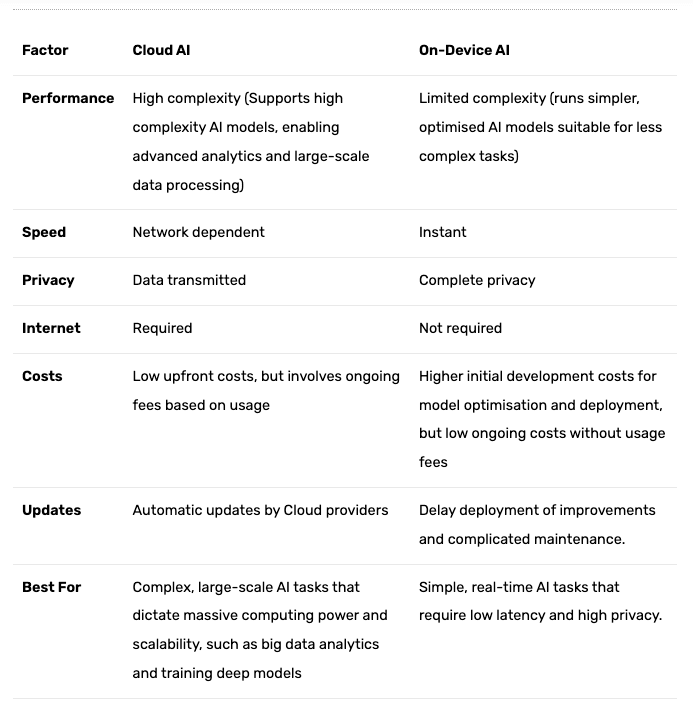
Quick Comparison Table: Cloud AI vs On-device
Here is a comparison table that clearly illustrates the differences between Cloud AI and On-Device AI.
How to choose between Cloud AI and On-Device AI?
Deciding between Cloud AI and On-Device AI often revolves around the particular requirements of your app.
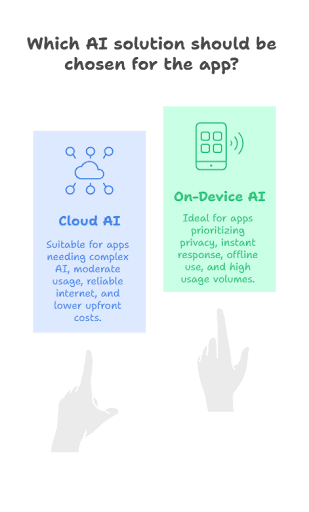
Choose Cloud AI if:
- You need intricate AI capabilities that require powerful computing resources (advanced chatbots or detailed image analysis).
- Your app has moderate usage levels where cloud scalability is manageable and cost-effective (typically under 50,000 monthly active users).
- Internet connectivity is reliable and consistent for your user base, ensuring smooth data transmission and AI processing.
- You prefer lower upfront development costs and can accommodate ongoing usage-based fees. Data privacy isn’t the highest priority, or you have measures to manage data security in the cloud environment.
Choose On-Device AI if:
- Privacy is crucial, where sensitive data must remain on the user’s device (such as in healthcare or finance apps)
- You require instant response times with ultra-low latency for real-time applications like augmented reality.
- Your users frequently operate offline, in environments with unreliable internet connectivity.
- Your app experiences high usage volumes where ongoing cloud costs could become prohibitive.
- AI features are relatively simple.
How can Techies Help?
Techies brings deep AI expertise, combining cloud and on-device AI solutions tailored for the Malaysian market. Our team of competent professionals offer the following:
- Experience in both cloud-based and on-device AI technologies
- Skill in React Native and Flutter development with seamless AI integration
- In-depth understanding of Malaysian market dynamics and PDPA compliance
- Proven track record with a portfolio of AI-driven apps deployed locally and regionally
Conclusion
Mobile apps are set to become even more adaptive and indispensable. This signals a future where AI will be seamlessly woven into the fabric of everyday digital life.
Cloud AI and On-Device AI each offer distinct advantages and challenges. Choosing between them is critical, depending on your mobile app's needs. When you need complex processing, scalability, and centralised updates, cloud AI is ideal. But when privacy, speed, and offline functionality are important, On-Device AI excels.
Ultimately, the best approach depends on your app’s priorities. However, the success of implementing either architecture ultimately hinges on partnering with the right experts.
Reach out to us at Techies for a deep competence in both cloud and on-device AI technologies. Our proven expertise ensures that your chosen AI architecture aligns with your business goals and regulatory requirements.
About Author
Kok Weng
Kok Weng Kong is a tech enthusiast and problem-solving expert with a passion for technology and innovation. As the Founder & CEO of Techies App Technologies Sdn. Bhd., he specializes in building beautiful web and mobile applications and providing branding and marketing solutions for businesses. With a background in Information Technology and extensive experience in the industry, Kok Weng Kong excels in creating innovative solutions for various tech challenges.


Digitizing businesses since 2017


© 2026 Techies | All rights reserved